← All features

Trading, mining & colonisation

Make every tonne count.

Find a buyer for the hold you already have. Plan the next profitable run. Catch unusual prices as commanders report them. Elite Nexus puts your cargo, ship and market data together in dedicated trading tools.

Download for Windows
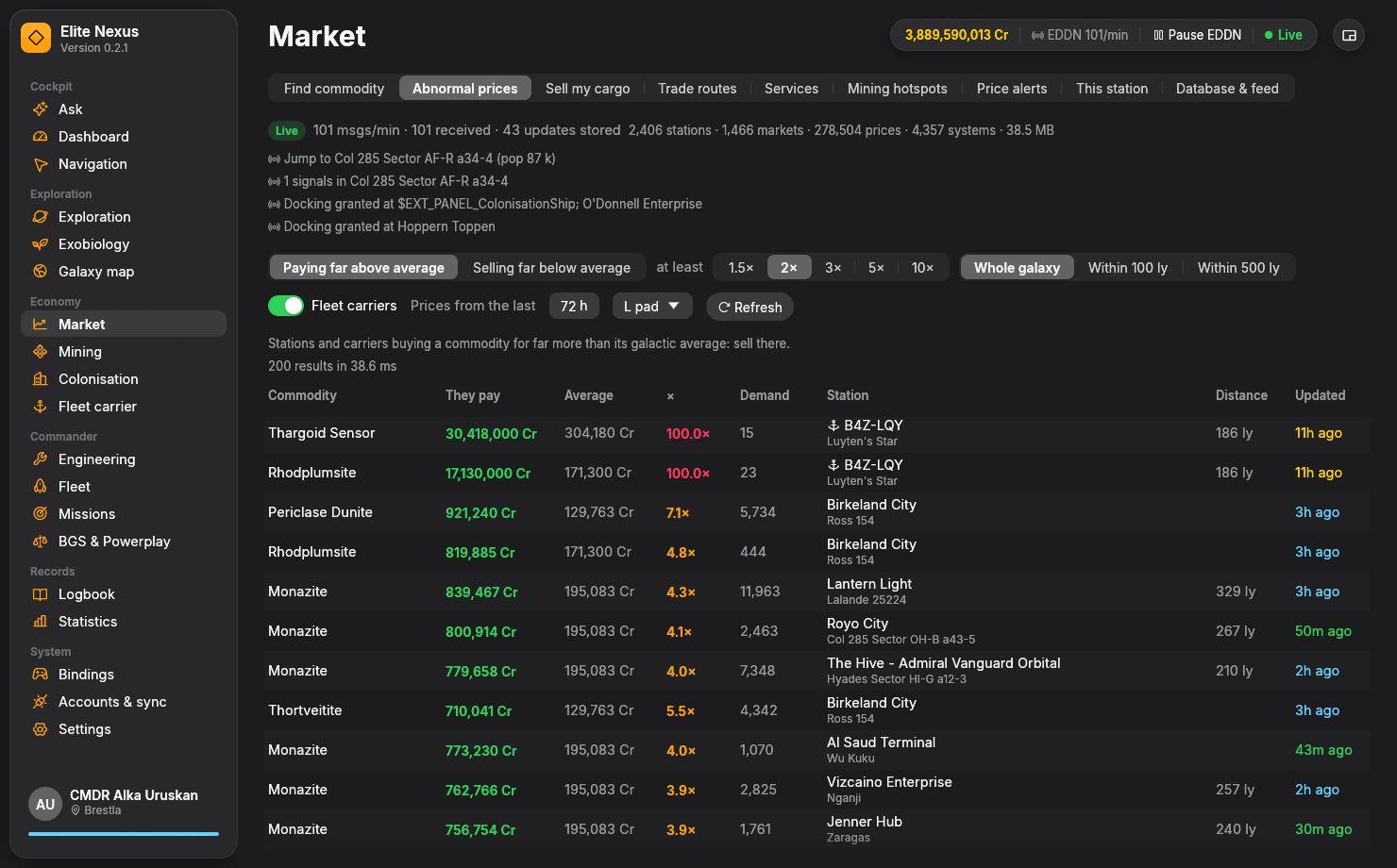
Elite Nexus Market page showing abnormal commodity prices, galactic-average comparisons, station distances and update ages.
Abnormal prices puts the offer, the galactic average, the distance and the age of the report in one view.

Start with your next sale

Your hold. Your ship. Your best known buyers.

Stop looking up a mixed cargo hold one commodity at a time. Open Sell my cargo and compare the stops that make sense for what you carry.

Sell the cargo you have

See the best single stops for your sellable cargo, with the total they can pay and how much they will buy. Station demand limits the estimate. A separate view gives you the best buyer for each commodity.

The plan refreshes when your hold or system changes. Mission cargo, stolen goods and limpets stay out of the sale plan.

Find the commodity you need

Search to buy or sell, then sort by best price, nearest station or freshest report. Filter by distance, landing pad, price age and minimum stock or demand; include fleet carriers and planetary ports when they suit the trip.

Your current ship supplies the default pad size. Search locally or across every market in your database.

Build the next run

A trading plan that starts with your actual capacity.

The Trade routes page uses your ship's cargo capacity and available credits, so the opportunities reflect what you can carry and afford.

  1. Choose the area

    Search around your current position, with a radius up to 1,000 ly and buying-to-selling hops up to 500 ly.

  2. Set the stops you can use

    Choose a landing pad requirement and whether to include fleet carriers. Compare the buying station, selling station, commodity and expected profit.

  3. Check the report, then fly

    Use the listed quantities, distance and data age to judge the run. Community prices are reports of a market, so stock and demand may change before you arrive.

Find the outliers

Spot the offer you would never have searched for.

Abnormal prices searches across commodities for stations and carriers paying far above the galactic average, or selling far below it.

Look for the opportunity, not just a commodity

Pick a comparison multiple from 1.5× to 10×, search the whole known galaxy or a nearby radius, and set how recent the prices must be. Results update as you change the filters.

The price sits beside its galactic average, quantity, location, distance and update age. Fleet carrier orders are compared against averages reported by stations, because carriers do not supply their own.

Let the market come to you

Set your price. Keep flying.

Watch for the deal you want without repeatedly running the same search.

Alerts with your conditions

Create a buy or sell alert for a commodity, price threshold and distance, with minimum stock or demand. For example: Tritium selling for at least 60,000 Cr within 50 ly.

Matching incoming market reports trigger an alert. Enable voice to hear it while you play.

A live feed and a local database

Market data arrives directly from EDDN community reports and your own journal. Database & feed shows what is coming in; an optional Spansh import gives the database broader station and market coverage.

You can receive community market data without enabling uploads. Price age stays visible, because a live feed cannot make every station's last report current.

From the ring to the construction site

Put the same market data to work beyond trading.

Find a hotspot. Track the session. Find a buyer.

Search known mining hotspots by mineral, distance and hotspot count, with nearby selling opportunities alongside the results. Hotspots come from shared DSS ring scans and your own discoveries.

The Mining page tracks refined tonnes, tonnes per hour, prospect quality, motherlodes and previous sessions.

Turn a depot's needs into the next cargo run.

Dock at a construction site to see its remaining requirements, progress and what you already carry. Your delivered tonnage is tracked too.

Where to buy looks around the construction site for nearby suppliers with enough stock for your load, matched to your ship's pad requirement. Price, stock and report age stay together.

Finish the trip

Find the service you came for.

Locate nearby raw, manufactured and encoded material traders, human and Guardian technology brokers, Interstellar Factors, Universal Cartographics and Vista Genomics. Search for shipyards, outfitting and black markets too. When you dock, This station shows the market's buy and sell prices, stock and demand.

Prefer to ask in plain language?

The optional AI co-pilot can use your cargo and market tools to help you investigate a trade. The dedicated pages above are ready to use on their own.

Meet the AI co-pilot

Keep exploring

More of your galaxy, connected.

Ready when you are

Your next session starts here.

Free and open source. Windows 10/11, 64-bit. Unzip and fly.

Get Elite Nexus