← All features

Elite Dangerous third-party tools

One app for the tools you run side by side.

Many commanders run four to eight third-party tools next to Elite Dangerous, plus a few websites. Here is what each popular tool does, which parts Elite Nexus covers in one native Windows app, and where the specialist tool is still the better choice.

Download for Windows
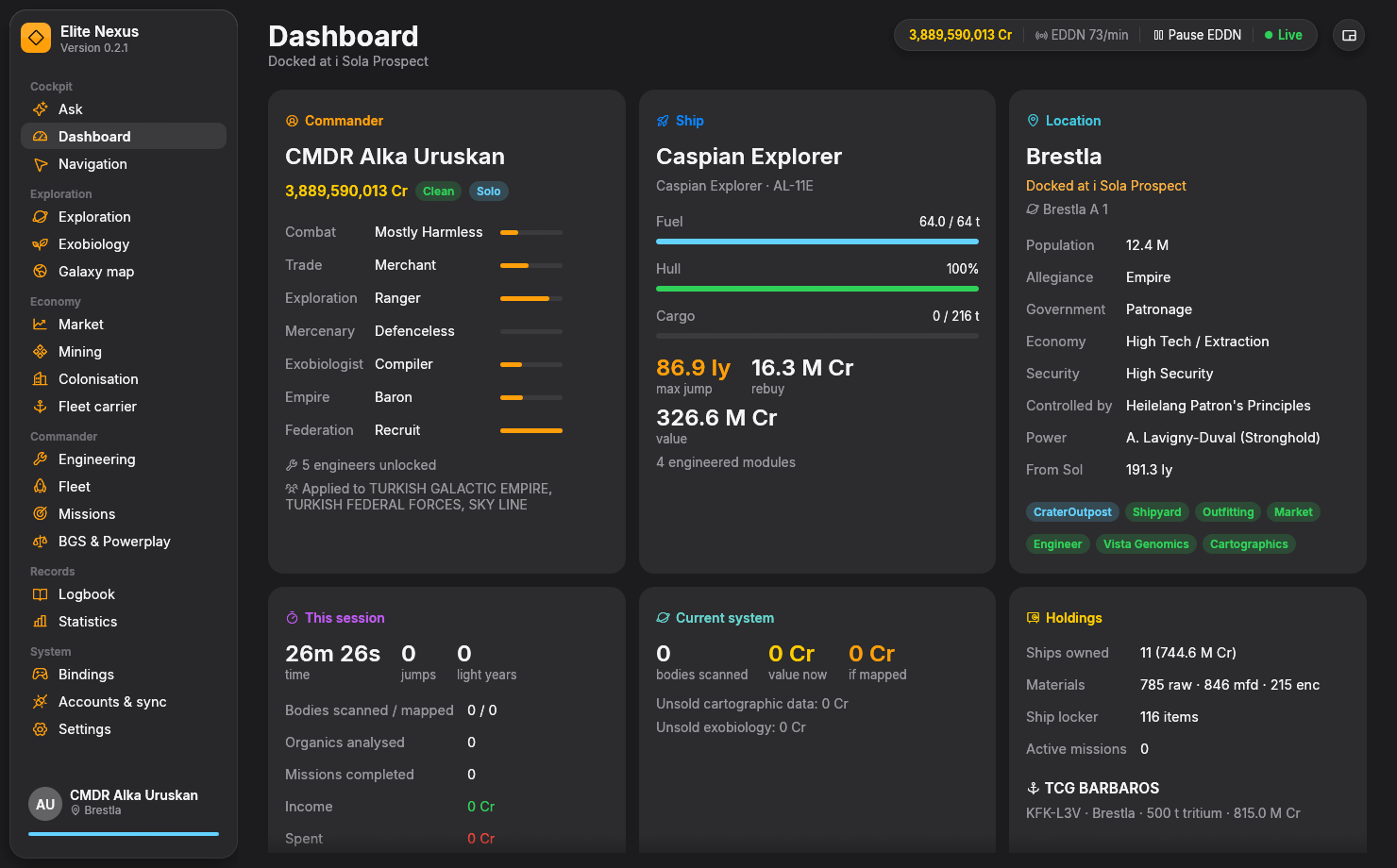
Elite Nexus dashboard with commander ranks, ship status, location and session stats in one window
One window for the jobs that usually take several tools and browser tabs.

Alternative to EDDiscovery

EDDiscovery: your history, scans and travels

EDDiscovery is the long-standing everything-app for Elite Dangerous: a captain's log and 3D star map built from your journal, with dozens of configurable panels.

What Elite Nexus covers

Your full journal history, loaded in well under a second and searchable event by event; exploration values for every body; a galaxy map of everywhere you've been; engineering, missions, materials, statistics and a credits ledger. It then follows the game live every 100 ms.

Where EDDiscovery is still better

Sheer depth: years of polish, a full 3D galaxy map, and options for nearly everything. If you rely on a particular EDDiscovery panel, keep it alongside Elite Nexus.

Alternative to ED Market Connector

EDMC: uploads to EDDN, EDSM and Inara

ED Market Connector (EDMC) is the community's upload backbone: it sends market and exploration data to EDDN, EDSM and Inara, and it hosts a large plugin ecosystem.

What Elite Nexus covers

Opt-in uploads to EDDN, EDSM, Inara and EDAstro that follow each service's rules, send only live events (never your history) and survive restarts in a retry queue. On top of that, Elite Nexus keeps its own copy of the live EDDN market feed for instant trade searches.

Where EDMC is still better

Its plugins, Frontier's Companion API and Linux support. If you depend on an EDMC plugin, run both: just switch each upload service on in only one of them.

Alternative to Odyssey Materials Helper

Odyssey Materials Helper and EDEngineer: engineering and materials

Odyssey Materials Helper (EDOMH) tracks Odyssey materials and engineering and includes a ship builder; EDEngineer tracked ship blueprints until it was archived in 2024.

What Elite Nexus covers

A blueprint wishlist (or one-click "upgrade to G5" from your ship) that adds up into a materials shopping list and a plan for which material trader to use. Engineers sorted unlocked-first and by distance, Odyssey suits and weapons, synthesis, the ship locker, and every ship's engineered loadout with one-click EDSY or Coriolis links.

Where EDOMH is still better

Deep on-foot Odyssey material tracking and its built-in ship builder.

Alternative to Observatory, BioInsights and SrvSurvey

Observatory, BioInsights and SrvSurvey: exploration and exobiology

Exploration and exobiology are usually split across several tools: Observatory Core with plugins such as BioInsights for notifications and species predictions, and SrvSurvey for in-game overlays.

What Elite Nexus covers

Every body with its value now and if mapped, Observatory-style highlights (Earth-likes, terraformables, rings, fast orbits and more), species predictions before you land, a live sampling radar with colony-range circles, a search for planets where the first-logged bonus may still be open, and Spansh tours that land on the Navigation page.

Where they are still better

Observatory's plugin ecosystem and custom criteria, and SrvSurvey's overlays drawn inside the game window. Elite Nexus has a compact always-on-top HUD instead.

Alternative to EDHM

EDHM and HUD colour themes

The Elite Dangerous HUD Mod (EDHM) uses 3Dmigoto to recolour individual HUD elements. The game's own colour matrix recolours everything at once, hostile contacts included.

What Elite Nexus covers

A HUD colour editor with community themes and a live cockpit preview, a switch that keeps hostile red, friendly green and shield blue while your theme recolours the HUD's orange, a cockpit-light dimmer, and Odyssey glare settings. Everything installs and comes out again in one click.

Where EDHM is still better

Colouring single HUD elements one by one. EDHM and Elite Nexus's graphics hook can't be installed together; Elite Nexus warns when it finds EDHM.

Alternative to EDCoPilot and EDDI

EDCoPilot and EDDI: voice and a ship's assistant

EDCoPilot and EDDI react to game events with speech, and EDCoPilot adds second-screen and VR panels.

What Elite Nexus covers

Spoken alerts through Windows speech (valuable bodies, sample spacing, low fuel before a non-scoopable star, interdictions, hull critical), a compact HUD for a second screen, and Ask: an AI co-pilot you type to that answers from your ship, journal, market database and Spansh.

Where they are still better

Voice commands and spoken conversation, VoiceAttack integration and VR panels.

Fewer browser tabs

Inara, Spansh and EDSM

These websites hold the community's big databases. Elite Nexus works with them rather than replacing them.

What Elite Nexus brings into the app

Spansh's neutron, exact, fleet carrier, Road to Riches and exobiology planners with your ship's real jump range; commodity searches, sell-my-cargo, trade routes and nearest services from a local EDDN database; and sync to Inara and EDSM when you switch it on.

Where the websites are still better

Their full galaxy databases, community features and pages beyond what an app shows.

Free, open source, Windows

Elite Nexus is free under GPL-3.0-or-later and runs on Windows 10 and 11 with the PC game. It's one executable with no installer: unzip and run. The tools above are made by volunteers who built Elite's community tooling over a decade, and Elite Nexus relies on their services and data.

Download Elite Nexus for Windows

Keep exploring

More of your galaxy, connected.

Ready when you are

Your next session starts here.

Free and open source. Windows 10/11, 64-bit. Unzip and fly.

Get Elite Nexus