No record
No shared record of mapping or sampling was found. The species is predicted, so you are choosing a promising candidate rather than a confirmed location.
Odyssey exobiology
Choose promising worlds before you land. Know when you've travelled far enough for the next sample. Keep your progress and unsold value in view from the first biological signal to Vista Genomics.
Download for Windows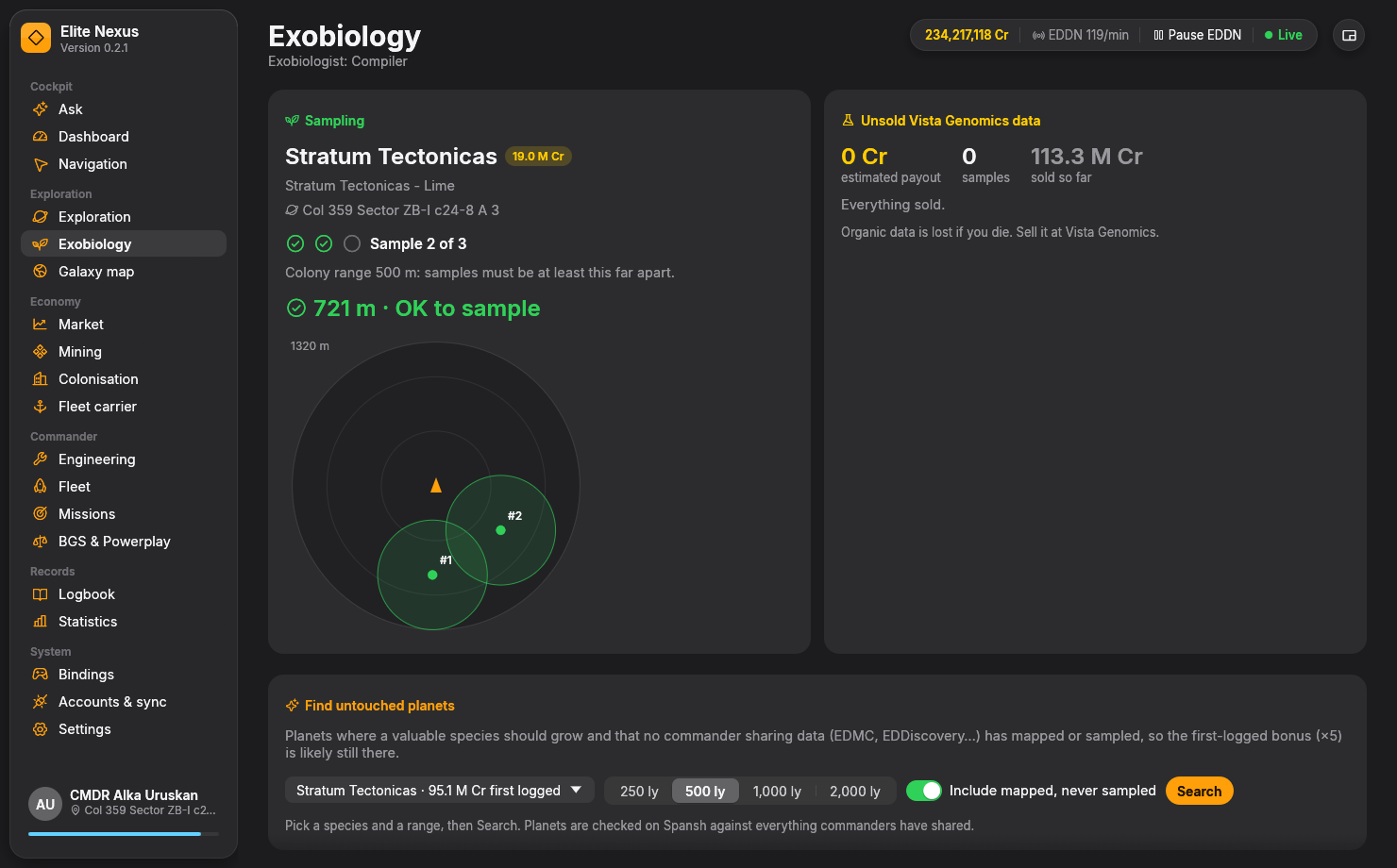
Live sampling radar
The radar follows your heading, so the top is the direction you are facing. Previous sample positions carry colony-range circles, and the page tells you how much farther to move.
Your species, value, colony range and three-sample progress appear as you use the genetic sampler.
See the distance to your nearest sample and the remaining spacing. The radar keeps the previous sample positions in view as you turn and move.
The indicator turns green once you are far enough from the recorded samples. Complete the analysis and the species joins your unsold data.
The compact, always-on-top HUD includes the sampling radar for a second monitor or the edge of your screen. Run Elite Nexus while sampling so it can record each sample's surface position.
Know what to look for
The system view puts bodies with life together, with signal counts, gravity, temperature and atmosphere. Species predictions give you a lead before you commit to the surface.
FSS scans reveal the bodies and their biological signals. DSS mapping identifies the genera; Elite Nexus shows likely species, their values and sampling ranges. Predictions remain visibly distinct from species you have actually sampled.
See what is still predicted, which species has samples in progress and which analysis is complete. You can move between worlds without trying to remember every signal and sample count.
See the wider exploration viewStrategy one · Bonus hunt
Target a valuable species, with Stratum Tectonicas as the default, and find planets whose conditions suit it. The search separates the evidence so you can judge which leads are worth the trip.
No shared record of mapping or sampling was found. The species is predicted, so you are choosing a promising candidate rather than a confirmed location.
Mapping confirms the genus, but no sample is on record. The first-logged bonus may already be gone; these candidates are hidden by default.
Filter by evidence, predicted chance, distance from the arrival star and gravity. The page explains exclusions such as existing samples, mapping without the target genus, populated systems and known landings.
Tour the best 15 builds a nearest-first route through your selected prospects and hands it to Navigation.
Strategy two · Sure value
Prefer a route with known targets? The Spansh exobiology planner builds a tour of planets where valuable species are on record.
Set a minimum species value, search radius and number of stops. Review the systems, planets, recorded species and base values before following the route.
Expect the base payout on these trips: someone has already logged the species, so the first-logged bonus has most likely been claimed.
Both known-species tours and bonus hunts go to Navigation. Arriving advances your progress, and automatic next-system copying makes it easy to keep moving.
See how routes workFrom fieldwork to payday
Unsold Vista Genomics data lists completed species and their expected value, identifying where the first-logged bonus is included. Your totals also track species analysed, credits already sold and Exobiologist rank.
Use Market's Services search to find nearby Vista Genomics. Your sampling, route and selling tools are all in the same app.
Find the services you needKeep exploring
Ready when you are
Free and open source. Windows 10/11, 64-bit. Unzip and fly.