Find a useful next job
Ask where to sell your cargo, look for price deals, compare trade routes, or find mining hotspots and nearby services. Results depend on the data available to the app.
Your everyday companion
Ask a question, check your session or keep an eye on the next star. Elite Nexus connects the everyday details of your flight, from a full dashboard to a compact panel beside the game.
Download for Windows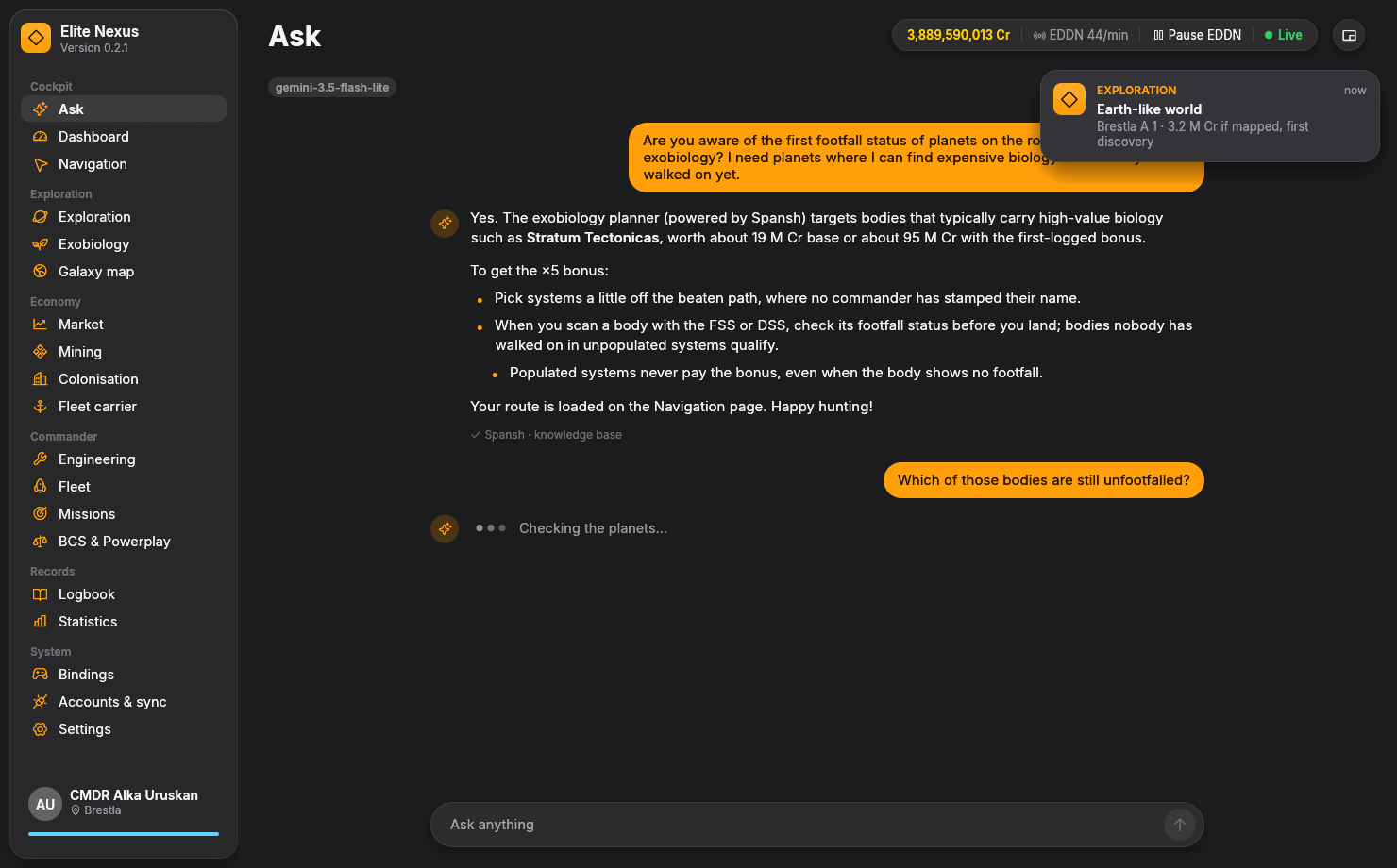
AI co-pilot
The Ask assistant can work from your location, ship, cargo, credits and journal. It uses tools to look up game data and a built-in knowledge base for mechanics and app guidance.
Ask where to sell your cargo, look for price deals, compare trade routes, or find mining hotspots and nearby services. Results depend on the data available to the app.
Query systems and planets, investigate biology, or plan an exploration or exobiology trip through Spansh. Record age and coverage matter, especially for first footfall and bonus hunting.
Routes planned by the assistant appear on Navigation, where you can follow the stops as you travel. Journal search can also help you find something from an earlier session.
“Where should I sell my cargo?” · “Plan an exobiology trip near me.” · “Where can I make money with this ship?”
The assistant can make mistakes. Check the destination, data age and route details before committing to a trip.
Choose your model
Gemini is the default setup. Open Other providers and model to choose Claude, a local model or a compatible custom service.
Use the setup link to obtain your own API key, paste it and connect. Model availability, limits, pricing and data terms are set by Google.
Choose Claude and provide your own API key. Requests use your Anthropic account and its applicable pricing and data terms.
Run a tool-capable model in Ollama or LM Studio, then choose Local model and its address. The model server must be running before Ask can answer.
With a cloud provider, your questions, conversation, commander context and tool results used for the answer are sent to that provider. A server running locally keeps model inference on your PC; tools that query Spansh or other online services still make network requests. API keys are stored encrypted with Windows DPAPI.
Dashboard & compact HUD
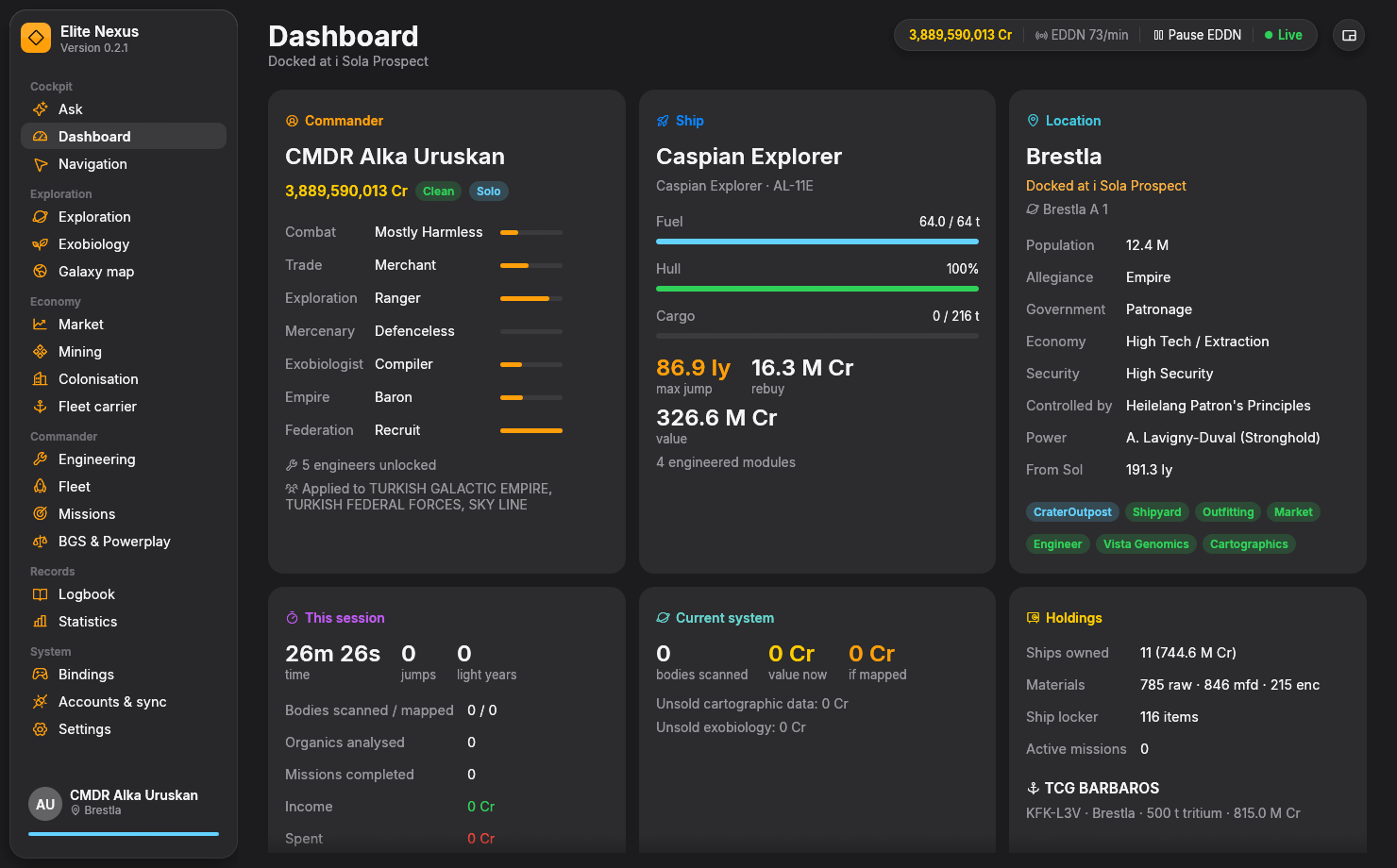
The dashboard gathers commander ranks, credits, location, ship status, holdings and current-system values, with a session view of your activity.
See earnings and activity since you logged in. Transfers to your own carrier are kept out of the session's spending total.
Switch to a small always-on-top panel for a second monitor or the edge of your screen. It shows location, fuel, the next star and whether it is scoopable, sampling radar, system value and recent alerts.
Use Full view to return to the complete app.
Voice & flight history
Alerts and searchable records help you follow a busy session and return to the details later.
Enable Windows speech and set the minimum alert priority. Events include critical hull, valuable bodies, biology samples, motherlodes, low fuel before a non-scoopable star and scheduled carrier jumps.
Find journal events by system, station or commander name. Review travel, docking, the credit ledger and the original event details.
Follow credits over time, income and spending by category, jumps per day and the statistics reported by the game.
Data & sync
Elite Nexus reads your game journals and keeps its settings, database and logs locally. Community uploads and AI provider requests have separate purposes and controls.
EDDN, EDSM, Inara and EDAstro sharing are opt-in. These integrations send live events rather than uploading your journal history, with persistent queues and service rate limits.
Accounts & sync shows sent, queued and failed counts, plus reasons for a pause. Turning a service off discards its pending queue. Keys are encrypted on your Windows account.
Inara requires approval for an app's name as well as a valid user API key. Until Elite Nexus is approved, Inara rejects requests and the app pauses sync with an explanation.
Ask sends the information needed for its responses to the model provider you select. The Accounts & sync switches control community uploads; they do not prevent those AI requests. Choose a local model server if you want model inference on your PC.
Yes. Ask is optional. The dashboard, journal tools and other feature pages work independently of an AI provider; online features still require their respective services.
Keep exploring
Ready when you are
Free and open source. Windows 10/11, 64-bit. Unzip and fly.